Tag from your roster with one press, or let MatchID do it. Included in all plans. Start your 14-day free trial.Get Started →
GalleryID
GalleryID CloudGalleryID DesktopMatchIDCaptionID
PhotographersTeamAthletic DepartmentsColleges & UniversitiesAthletic ConferencesOrganizations
HelpComparePricingBlogAbout
Book a DemoLog In
GalleryID CloudGalleryID Desktop
Help home

Start here

How GalleryID Cloud worksUse GalleryID Cloud on your phone

Galleries and photos

Find your way around the dashboardFind a gallery in the gallery listCreate galleries for a game and send upload linksSee the season on the Calendar and assign coverageOrganize galleries with folders

Search and collections

Search photos across every gallerySave photos to favorites and collections

Uploading and sharing

Upload a galleryShare a gallery with a linkCollect photos with an upload linkShare a whole folder with one link

MatchID

Drop headshots into MatchIDChoose which people MatchID looks forApprove and reject MatchID matchesPull a roster from your athletics site

Names and captions by hand

Tag by typing a name, number or codeBuild a CaptionID shortcode rosterGeneral Tags

Settings, naming and metadata

Choose which fields the names write toChange how files are named on downloadSet branding, domain and org-wide defaults

Users and access

Invite people and set what they can seeChoose a role and what it can doGrant folder access to a whole groupSwitch between organizationsGive athletes their own login

Selling

Set up the download store with StripeTrack sales and manage buyer downloadsWhat a buyer sees when they buy a photo

Billing and your account

Change your plan and check storage usageEarn credit by referring another photographerManage your Desktop license and devicesCheck a support ticket you opened

Integrations

Deliver photos over FTPSend photos on to PhotoShelter

More

TutorialsFAQContact support
Help›Selling›Track sales and manage buyer downloads

Selling

Track sales and manage buyer downloads

Org admin · Manage billingRequires Download Store
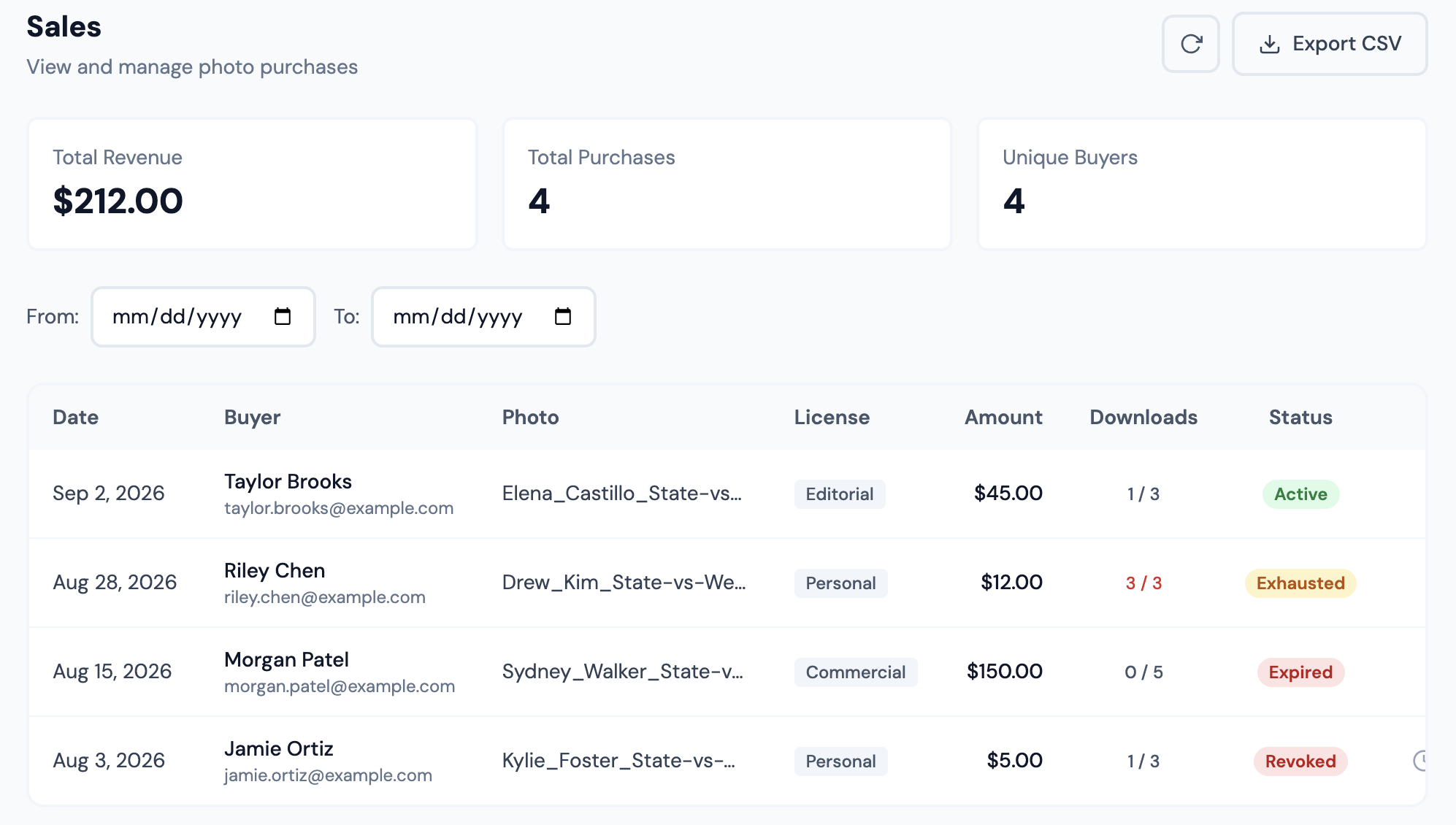
Sales: totals, date filter, and a row per purchase with Extend and Revoke
Sales: totals, date filter, and a row per purchase with Extend and Revoke.

Each photo purchase from your galleries, with revenue, purchase and unique buyer totals across the top.

The date filter changes the totals

Total Revenue is the revenue for the date range you have set, not lifetime revenue. Clear the dates to see everything. The CSV export respects the filter too.

Revenue is the amount buyers were charged. Figures net of Stripe's fees only exist in your Stripe dashboard.

Extend and revoke

Two icon buttons on each row, labelled only on hover.

  • •Extend sets the download link to expire 30 days from today. It resets the clock rather than adding to what is left, and it will revive an already-expired purchase.
  • •Revoke ends a buyer’s access by using up their remaining downloads. The row then reads Exhausted.
Revoke cannot be undone from this screen, and Extend will not restore access afterwards, because the download count stays used up. Be deliberate, the two buttons sit next to each other with no text labels.

The list has no search or sorting; the date range is the only filter.

GalleryID

Athlete naming for sports photographers and athletic departments. GalleryID Desktop ingests, culls and captions on your own computer, and nothing is uploaded; SidelineID is Desktop on your phone at the game. GalleryID Cloud is the hosted archive you search by athlete name. The built-in Roster Library covers NCAA Division I, II and III and the major US pro leagues.

Find photos by athlete, not by filename.

iPhone and Android apps for both products →

Product

GalleryID DesktopGalleryID CloudMatchIDCaptionIDPhone appsFeaturesPricingCompare

Solutions

Sports PhotographersTeamAthletic DepartmentsColleges & UniversitiesAthletic ConferencesOrganizations

Company

Book a 30-Min DemoAboutContactPrivacyTermsDPA

Resources

HelpCloud Getting StartedDesktop Getting StartedCaptioning SoftwareRoster LibraryAfter Photo Mechanic PlusBlog
© 2026 GalleryID. All rights reserved.Built by working sports photographers, on the same deadline you are.macOS, Windows and the web.

Photo Mechanic and Photo Mechanic Plus are trademarks of Camera Bits, Inc. Lightroom, Photoshop and Adobe are trademarks of Adobe Inc. Capture One is a trademark of Capture One A/S. Sideline Captions, Caption Pro, PhotoShelter, SmugMug, Zenfolio, Pixieset, Pic-Time and all other product and company names referenced on this site are trademarks of their respective owners. GalleryID is not affiliated with, sponsored by, or endorsed by any of them. Those names are used here only to identify the products being described or compared, and any comparison reflects each vendor’s published documentation at the time of writing.