Names and captions by hand
Build a CaptionID shortcode roster
Rows do not have to be people. A code can expand to a phrase or a caption fragment. It works with no headshots at all, and existing Photo Mechanic and GalleryID Desktop code replacement values carry over.
Three ways to get one
Right-click a folder or a gallery and choose Shortcode Roster..., or open Org Dashboard → Shortcode Rosters. The setup panel offers three routes, and they behave differently enough to be worth choosing deliberately.
| Route | What it does |
|---|---|
| Build from a league | Pick a league and up to four teams, and the codes are generated for you. This is the only route that can pull an opponent in later. |
| Use a saved roster | Assigns one you already have, exactly as it stands. Its rows are not rewritten. |
| Import a file | TSV, CSV or XLSX, where column A already is the shortcode. There is no league or team behind it, so no opponent step. |
Set the folder up once, then pick the opponent per game
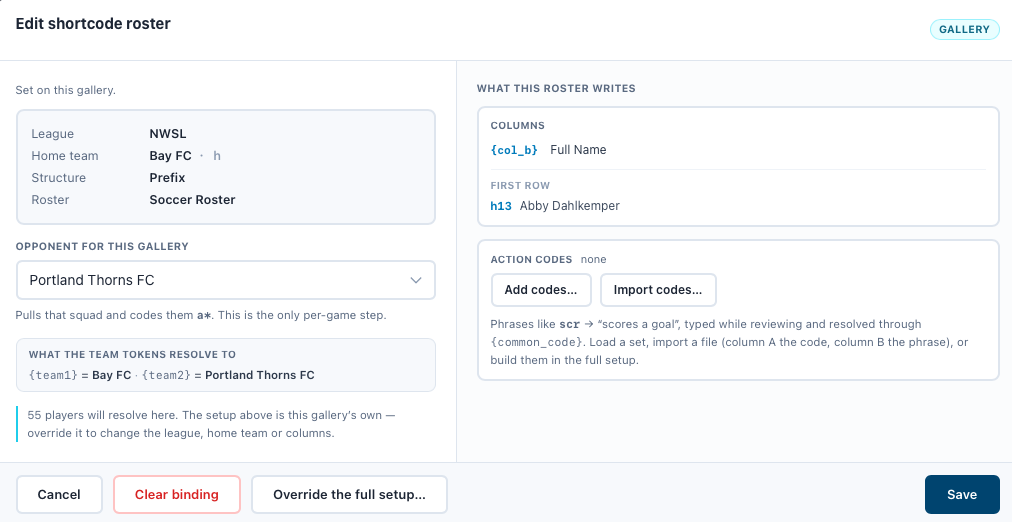
Build the roster on the folder with your own team in the first slot and the second slot left open. Each gallery inside then opens on a single control, Opponent for this gallery, and pulls that squad in. Everything else stays inherited.
{team1} because it is first, and the opponent is {team2}. Picking an opponent never promotes them to the home slot, so a caption written against {team1} stays correct all season.What each column holds
Column B is the name that gets tagged. C through F fill {col_c} to {col_f} in a metadata template. Each column picks from a list of ready-made formats, including four long forms such as “Marcus Cole #12 of the Riverdale Wolves”, or Custom Format... where you write your own from tokens like {name}, {jersey} and {team}. A live preview shows the finished rows before you save.
Action codes
The same roster also holds action codes: scr expanding to “scores a goal”, and the like. They are not people, so they never reach Persons Shown and they resolve through {common_code} instead of the person tokens. Write {team1} and {team2} in a phrase rather than a club name and it stays right from game to game.
Save a set of them by name and load it into another roster. Loading a set replaces the codes rather than merging them.
Importing a file
Column A is the shortcode. A row with nothing in column A is dropped. Import is a two-step: nothing is written until you have seen the review screen, which counts the people and the action codes and asks you to confirm the split.
What happens to photos you already tagged
- •Action codes are frozen at the moment you tag. Editing a phrase later does not rewrite captions that already carry it.
- •People are pinned to a roster version. Refreshing or re-importing mints a new version, and a photo keeps resolving through the one it was tagged against, so a jersey reassigned next season does not rewrite last season.
- •A gallery can be pinned to an older squad with Squad version in its Shortcode Roster section. The default, Latest — follows refreshes, is what most galleries want.
- •Dropping a team from a scope leaves the names on photos already tagged. Their roster columns stop resolving there, and the panel tells you how many photos that affects.