Metadata
Fill fields from the camera with ExifID
Names from the camera, not the keyboard. An ExifID set is a lookup table: column A is matched against something the photo already carries, and the matching row's other columns become {exif_b} to {exif_f} wherever you use them.
What a set does
Two sets people build first:
| Question | Match on | Fills |
|---|---|---|
| Who made the photo? | Camera body serial | Photographer, copyright and credit, so a second camera’s frames land with the right byline and nobody types it. |
| Where were you in the game? | Card folder | A period. Name the camera’s folders SET1, SET2 and so on, and each frame says which set it came from. |
The ExifID screen
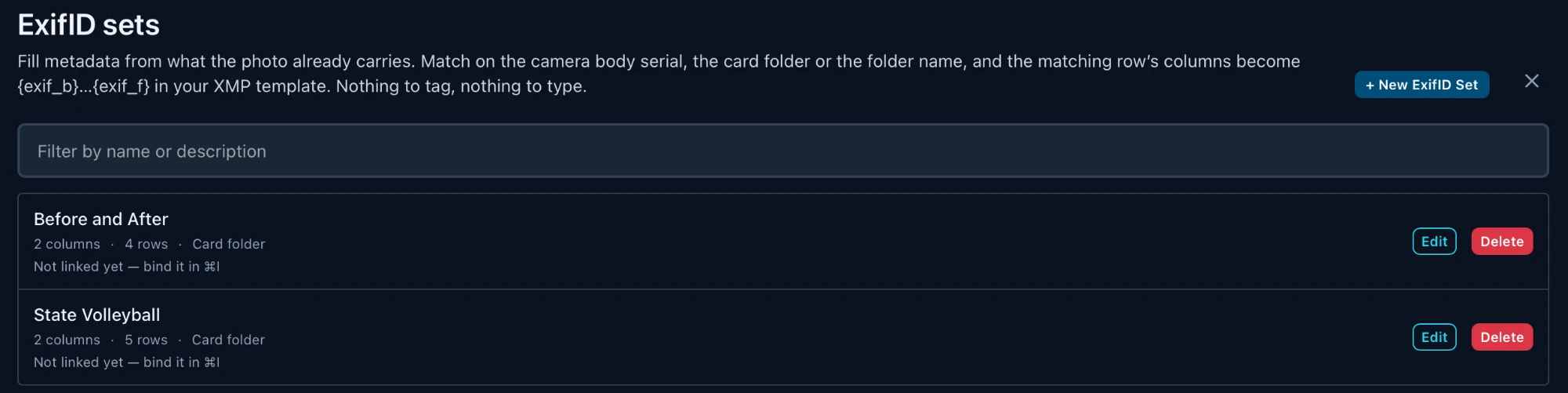
Open it from Settings ▸ ExifID, or from Manage sets… in the ⌘I editor's ExifID picker.
| Control | What it does |
|---|---|
| + New ExifID Set | Opens the set editor on a blank set. |
| Filter by name or description | Narrows the list. |
| Used by … | The templates and folders bound to this set, so you know what an edit affects. |
| Not linked yet | Nothing is bound to it, so its tokens resolve empty outside the editor. Bind it in ⌘I (see Bind the set). |
| Edit / Delete | Opens the set, or removes it. |
Create a set
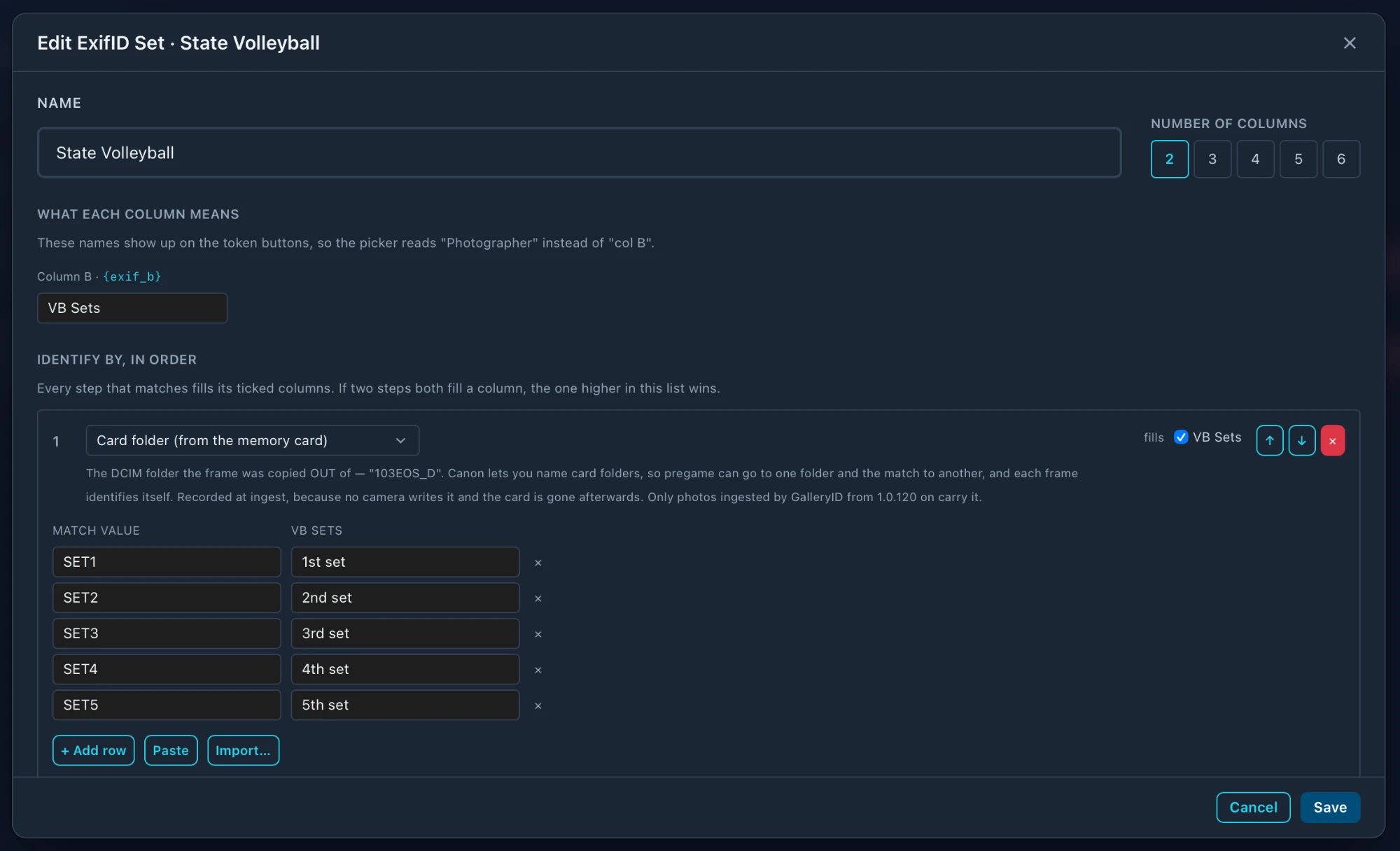
- 1
Name it and pick the columns
Give the set a name, then pick how many columns it has. Column A is what gets matched, so 2 means one value to fill (B) and 6 means five (B to F). - 2
Say what each column means
Name B to F. The names show on the token buttons, so the picker reads “Photographer” instead of “col B”. - 3
Choose how to identify the photo
Pick what column A is matched against, tick the columns that key fills, and add the rows. - 4
Create, then bind it
A set does nothing until something points at it. See Bind the set.
Name and number of columns

What each column means

Identify by, in order
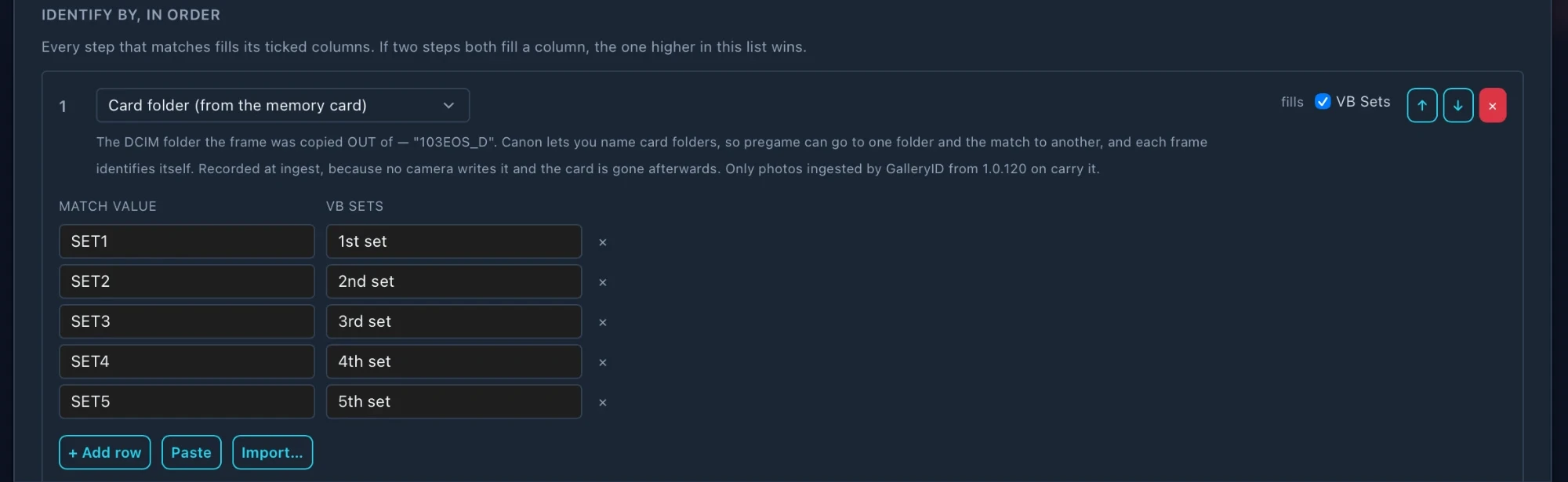
| Control | What it does |
|---|---|
| Match type | What column A is compared with. See What a key can match. |
| fills | The columns this key may fill. This is how one set answers two questions: the serial key fills photographer and credit, the folder key fills the period. |
| ↑ ↓ | Moves the key up or down the list. |
| × (red) | Removes the key. |
What a key can match
| Match type | Compares column A with | Use it for |
|---|---|---|
| Camera body serial | The body’s serial number | The photographer holding that camera. |
| Camera model | The model, such as Canon EOS R3 | Each body of that model. |
| Camera make | Canon, Nikon, Sony | Telling brands apart. |
| Lens model | The lens the camera recorded | Lens-specific credits or notes. |
| Card folder (from the memory card) | The DCIM folder the frame was copied out of, such as 103EOS_D | Periods of a game. Recorded at ingest (1.0.120 on), so it still works after the photos move. |
| Card folder contains | Text anywhere in the card folder name | The one to use for card folders. Cameras roll 101EOS_B to 102EOS_B, so a row of 101 names the period and EOS_B names the body. |
| Folder prefix | The start of the folder the file is in now | Folders named 101 Baseball or 101_baseball. Stops matching if the file moves. |
| Folder name contains | Text anywhere in the folder name | When the identifying part sits at the end of the folder name. |
| Folder name (exact) | The whole folder name | One folder, one value. |
| Original filename prefix | The prefix the camera gave the file, kept through a rename | Camera 1 set to AS1, camera 2 to AS2. Easier to hand an editor than a serial. |
| Filename prefix (current name) | The start of the file’s current name | Files already renamed the way you want. |
101EOS_B beats 101. For exact and prefix types, the first row that matches wins.Rows
| Control | What it does |
|---|---|
| + Add row | Adds an empty row to this key. |
| Paste | Pastes rows copied from a spreadsheet. |
| Import… | Loads a TSV, CSV, TXT or XLSX file into the key you run it from. |
| × (grey) | Removes that row. |
Test the set

Test with a photo… runs the set on a photo you pick, using what's on screen now, not the last saved version. For each key it shows what the photo carries, whether it matched, and what it filled, then the final value of each token.


Bind the set
A set only fills in where something points at it. There are three ways to bind one.
| Where | What it does |
|---|---|
| ⌘I editor ▸ ExifID | A pick here is used for this screen only. use for this folder binds it to the folder the photos are in. use everywhere makes it the default for folders without their own. See Build an IPTC template. |
| Saved with a template | Save the template with a set picked and the set travels with it, including into the folders that template is written to. |
| Ingest dialog ▸ ExifID | Automatic uses the template's set, or else the destination folder's. Pick one to override it. It's bound to the new folders after the copy. See Ingest from a card. |
Use the tokens
- •
{exif_b}to{exif_f}work anywhere other tokens do: template fields, the ingest folder pattern and filename, Rename Files, and FTP paths. - •At ingest they resolve as the files are copied, so the folder name and the caption can both carry the period.
- •A frame no key can identify gets a gap, never the raw token.
Troubleshooting
| What you see | Why, and what to do |
|---|---|
| Tokens empty everywhere except the editor | The set isn’t bound. The ExifID screen says Not linked yet. Use use for this folder or use everywhere. |
| A whole folder resolves empty | Nearly always the key. A card-folder key on photos that weren’t ingested by GalleryID 1.0.120 or later, or an exact key on a folder or file name that changed. |
| The wrong value wins | Two keys fill the same column. Move the one you trust higher in the list. |
| One frame is blank | No row matches what that frame carries. Check the match value against the photo’s serial, folder or name. |